

Relight
The Relight IC-LoRA relights an exterior video to a chosen sun direction and lighting hardness. You composite a small shaded “light-direction ball” into the top right corner of the reference video; the model relights the clip so the key light matches the ball’s direction and a short directional caption. Relight was only trained to relight a scene: it does not restyle your content.
You can run Relight two ways: the ComfyUI workflow, which composites the light-direction ball for you, or the Python pipeline, where you build the reference video yourself. Each is covered in its own section.
What You’ll Need
Model: IC-LoRA Relight: https://huggingface.co/Lightricks/LTX-2.3-22b-IC-LoRA-Relight/
Model Files
How It Works
The model conditions on your source clip with a light-direction ball composited into the top-right corner, plus a short caption. It relights the clip in a single-stage pass at the target resolution, with reference_downscale_factor 1 and no separate relighting model at inference. The LoRA reads the ball as pixels, so any correctly-rendered ball works regardless of how it was produced.
Using Relight in ComfyUI
The ComfyUI graph renders and composites the ball for you, so there’s nothing to prepare by hand.
- Copy
ltx-2.3-22b-ic-lora-relight-1.0.safetensorsintomodels/loras. - Open the workflow
LTX-2.3_Relight_ICLoRA_SingleStage_Distilled.json. It wires the LTX-2.3-22B distilled base, the IC-LoRA loader (at strength 1.0), theSphereLightNode, and in-graph ball compositing. - Load your source video in the
LoadVideonode. - Set the light direction on the
SphereLightNode(rotation / elevation / intensity) and write the prompt (see recommendations below). - Run. The graph relights single-stage at the target resolution (1280×704).
Using Relight in a Python Pipeline
The Python pipeline has no in-graph ball compositing, so you need to build the reference video yourself — your source clip with the light-direction ball composited in — then run a single stage pipeline.
Building the Reference Video
The model takes no direction parameter: the ball composited into the frame is the control signal. You composite a small light-direction ball patch over the top-right corner of every frame: a sphere lit from your target direction, with its shadow cast the opposite way. Geometry, measured on the shipped examples at the trained 1280×704:
Steps:
-
Standardize the source clip to 1280×704, 121 frames, 24 fps.
-
Render the ball. Use the Sphere-Light-Render node and save its output, or render your own: a grey square, a matte sphere lit from the direction you want, and a shadow tail pointing away from the light. Save it as
ball.png. -
Composite it onto every frame. The direction is fixed for the whole clip, so the same patch goes on all frames:
overlay=W-w-22:22places the patch 22 px in from the top-right corner. -
Pass the result as
--video-conditioning source_plus_ball.mp4in the pipeline call below.
Composite the ball last, after every scaling step, and confirm it survives your final encode. A ball that’s missing, cropped, in the wrong corner, or absent from some frames leaves the model with no direction to follow. This is the most common cause of a weak or inconsistent relight.
Running the pipeline
With the reference video built, run a single stage at the target size. Request 2× the target resolution and pass --skip-stage-2, so Stage 1’s output is your target (2560×1408 → 1280×704):
Recommended Settings
-
LoRA strength: 1.0
-
Resolution & frames: The model was trained at 1280×704 × 121 frames @ 24fps; higher resolutions work at reduced clip length.
-
Prompting: Do not describe scene content. The prompt should follow the format of the trigger, a look phrase, and a direction phrase.
Format:
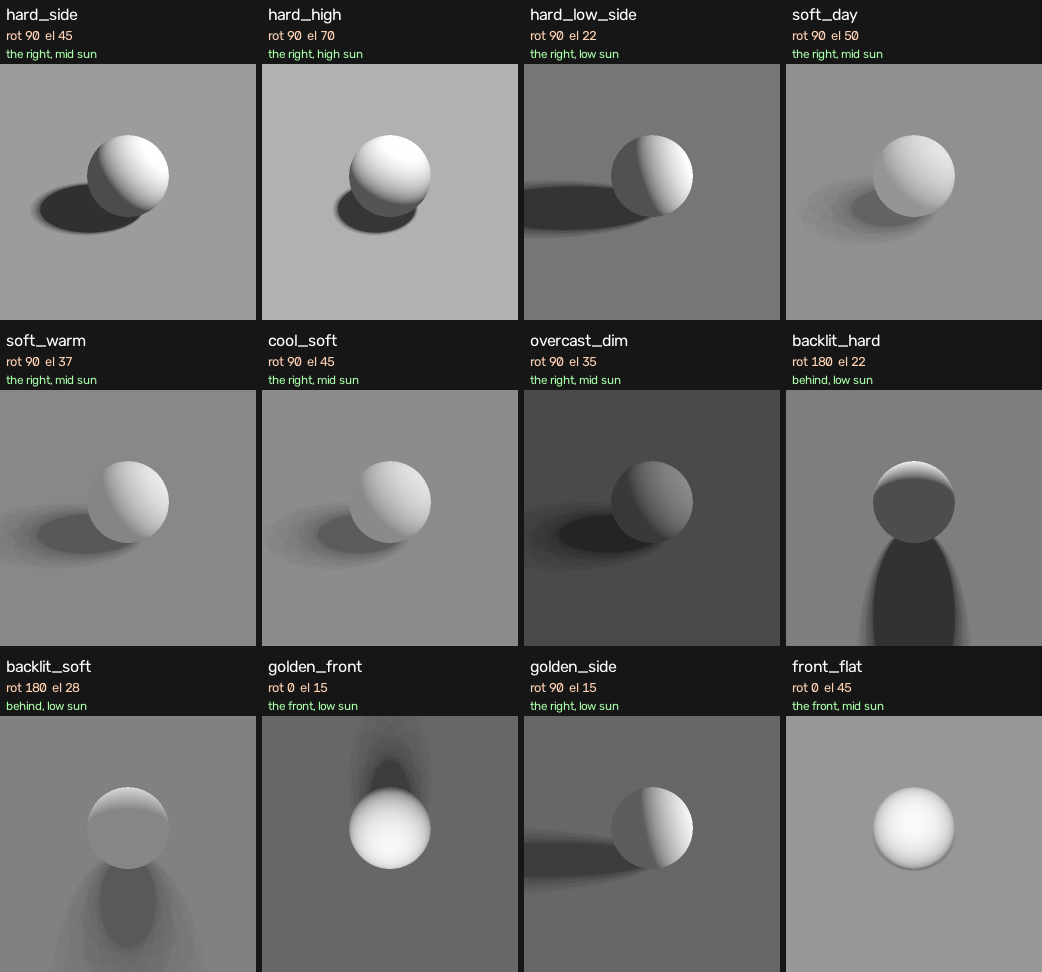
<direction>: front · front-right · right · back-right · behind · back-left · left · front-left<look>(12 trained): hard directional sunlight · hard high-angle sunlight · hard low-angle sunlight · soft diffused daylight · soft warm afternoon light · cool soft daylight · dim overcast light · strong backlight with rim light · soft hazy backlight · warm golden low front sun · warm golden low side sun · frontal sunlightExample:
The caption’s direction and the ball’s direction must agree (see mapping below). You can optionally append an altitude band that matches the ball’s elevation (low sun, mid sun, or high sun), which mirrors how the training captions were written.
Direction Mapping
The ball’s rotation (snapped to the nearest 45°) sets the direction phrase; its elevation sets the altitude band.
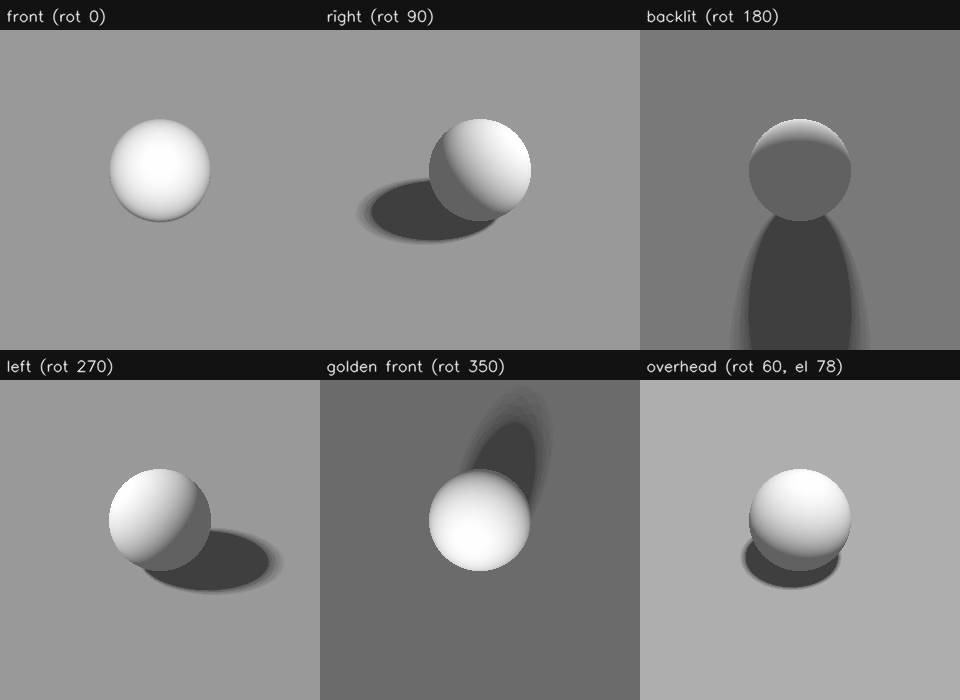
Altitude band from elevation: < 33° = low sun · 33–57° = mid sun · ≥ 58° = high sun. Examples: rot 90, el 45 → "the right, mid sun"; rot 180, el 22 → "behind, low sun".
The 12 trained looks, each shown on a reference sphere:
Tips and Troubleshooting
- Exterior only — The model was trained on exterior settings only. Interior settings are unsupported.
- Single-stage only — the true 2-stage path is unusable here; Stage 2 drops the reference and the LoRA. Request the target size directly in one stage.
- Match the caption to the ball — a caption that contradicts the ball’s direction fights the reference; the model follows the ball.
- Direction coverage — pick a direction distinct from the scene’s own lighting for the clearest effect; backlit looks bias toward “behind”.
Technical Note
- The light-direction-ball convention follows Eric Venti’s Sun-Direction LoRA for FLUX.2 and the accompanying Sphere-Light-Render node.